
Tor bridges: which type to use when the network is blocked
Tor bridges are how you connect when a provider or a government blocks the public Tor relays, or when you cannot afford to be seen connecting to them. A bridge is a relay that is not listed in the public directory. The pluggable transport in front of it is what makes the traffic look like something else. Which one works depends on the country: Tor's general advice is to try each transport until one connects, but its country page names a first choice for Russia, China, Turkmenistan and Belarus, and says nothing about Iran. The table below puts that advice next to Tor Metrics and the 2026 blocking reports.
Which bridge works in Russia, Iran, China, Turkmenistan and Belarus
The rows are Tor's current advice where it has any, checked against the support page on . Iran is the row that page does not have. The evidence column is there so a recommendation from 2022 is not pretending to be a measurement from last week.
| Where you are | Try first | If that fails | What the record actually says |
|---|---|---|---|
| Russia | obfs4 | WebTunnel, on a host that is not OVH, Hetzner, Linode or DigitalOcean | Since December 2021, direct connections are blocked at many providers. obfs4 is still the most used. Some mobile networks block it with deep packet inspection. In March 2026 the Snowflake bridge operator reported new blocking aimed at Snowflake's DTLS fingerprint, which a reply called the Siberian block. |
| Iran | Snowflake | WebTunnel, once the country's outbound link is actually up | No Iran section on the censored-regions page. Connection Assist was switched to Snowflake for Iran on 26 September 2022. On 12 March 2024 the Tor Project said WebTunnel did not work in some of Iran. A bridge operator wrote on 28 May 2026 that both WebTunnel and Snowflake were carrying Iranian users after the shutdown. |
| China | WebTunnel | Built-in Snowflake, then meek | Tor tells you to get WebTunnel lines from Telegram or the bridges website, and says meek will be slow because of a bandwidth cap. Since 5 June 2025, Connection Assist's first offer in China has been WebTunnel, which is why the written instructions start there instead of with obfs4. |
| Turkmenistan | Snowflake, with the AMP cache as the front | obfs4 only if the bridge is on a lesser-known host | Direct access is heavily restricted. Major hosting companies' obfs4 bridges get blocked. Snowflake became the Connection Assist default there on 5 June 2025, after a jump from near zero to over 5,000 bridge users in April 2025. |
| Belarus | A direct connection. Click Connect. | obfs4, WebTunnel, or Snowflake | Tor says it is not aware of a specific bridge-blocking method in Belarus, and that direct access still works on some providers. The same day WebTunnel became the default in China, it was removed from Connection Assist in Belarus. Usable, and no longer the automatic pick, can both be true. |
| Anywhere else | Connect with no bridge | The built-in transports, then a bridge you request | Tor's general instruction is to try obfs4, WebTunnel, Snowflake and meek, because each one fails in different circumstances. It does not rank them for an unnamed country. |
Tor Metrics still lists an internet shutdown starting 28 February 2026 as "to present," and an earlier one from 8 to 27 January. That page's newest row is dated 9 March 2026, so the open end may simply be an entry nobody closed. anoni.net, writing on 28 May 2026, said Cloudflare Radar showed outbound traffic near 0.3 percent of normal until about 26 May, more than 80 days, and that during the blackout people could not reach Tor because the outbound link itself was down. No bridge type fixes a cable that is not passing traffic. The Snowflake daily-operations note for March, posted 7 April 2026, shows the same shutdown as a drop in users from Iran, and warns that geolocation mixes some of those users into the United States figure.
After the link came back, the two written accounts of WebTunnel in Iran are three years apart and say different things. The March 2024 announcement is the Tor Project: WebTunnel was failing in some regions, and they had 60 WebTunnel bridges and more than 700 daily users worldwide, which is not a 2026 count. The May 2026 account is one community operator, not a support page, saying Telegram distribution and more bridges coincided with Iranian users reaching Tor over WebTunnel, and that Snowflake remained one of the better tools there. Until Tor adds an Iran section, Snowflake first matches the last Connection Assist change they published, and WebTunnel is the second try, not a myth and not a promise.
Russia's Snowflake problem is narrower and newer than the 2021 block. Metrics records Snowflake DTLS blocking in Russia from 6 to 21 November 2024, and a separate block, still open in the timeline, of directory authorities, relays, default obfs4, meek-azure and Snowflake at some Russian providers since 1 December 2021. OONI's December 2021 report found IP blocking on some networks and successful Tor measurements on many others, which is why "Russia blocks Tor" was never a single switch. The March 2026 DTLS report is a reason not to lead with Snowflake there now. obfs4 first, WebTunnel if the mobile network eats obfs4. Tor points Russians who are still stuck to its forum guide, and asks you to put "private bridge ru" in the message if you write to frontdesk@torproject.org.
How many people are on each transport is the other half of "what works," and it is not the same as "what you should pick." On 16 September 2026 the bridge-transport CSV showed obfs4 at 109,432 users, Snowflake at 90,255 and WebTunnel at 32,830. Those are estimates from directory requests, one day, not a census. The 30-day means, the country shares, and the OONI anomaly rates from July to October 2026 are on the 2026 Tor numbers page. Use that page to see the scale. Use the table above to choose a line.
What a bridge changes, and what obfs4, Snowflake, WebTunnel and meek pretend to be
You need one when your provider or a government blocks direct access to Tor. Ordinary relays are in a public list, so a censor can block the list. Bridges are volunteers' relays kept off that list. That is the whole of the "unlisted" protection: an adversary who does not already have the address has to go looking.
obfs4 and WebTunnel need a bridge address. meek and Snowflake do not. Snowflake and meek use a different trick, so "get a bridge line" is the wrong errand for those two. Tor Browser already knows how to reach them.
- obfs4
- Makes Tor traffic look random, and stops censors finding bridges by scanning the internet. It is the one Russia still uses most. It loses to a network that only allows protocols it recognises. The WebTunnel announcement says that kind of allow-list drops obfs4 because the traffic matches no permitted protocol, and passes WebTunnel because it looks like HTTPS.
- Snowflake
- Sends you through volunteer proxies so the connection looks like a video call. The Snowflake site is more specific: it uses WebRTC, the same technology as browser video calls, and the proxies sit in uncensored countries. DTLS is the piece of WebRTC the March 2026 Russian blocking went after. No bridge line to copy. You select it.
- WebTunnel
- Wraps the connection in a WebSocket-like HTTPS session, so an onlooker sees an ordinary visit to a web server. It can share a domain, an address and a port with a real site. Announced for the stable Tor Browser on 12 March 2024. It does not work on Tor Browser 12.5. You usually have to paste a bridge line. Built-in WebTunnel is not how the China instructions tell you to get it.
- meek
- Looks like you are browsing a big site on a CDN or a cloud provider, instead of using Tor. Snowflake's own FAQ still describes the deployed form as a connection to Microsoft, meek-azure. In China, Tor tells you to expect it to be slow. It is the last built-in option, not the one to live on.
Inside Tor Browser the program that speaks these pluggable transports is called Lyrebird. You will see that name in logs. You do not configure Lyrebird by hand unless you are running the Tor daemon rather than the browser. The torrc instructions on Tor's site are for that daemon, little-t tor, and the page says so three times. If you are in Tor Browser, stay on the Browser steps below. The sample bridge line in the daemon page is not something you type into the browser's box unless you were given that line.
How to get Tor bridges when the website is blocked
Bridge addresses are not public. Tor gives you four ways to ask: Moat inside Tor Browser, the bridges website, Telegram, or email. Moat and the website need a network that can reach Tor's distributor. Telegram and email do not need torproject.org to load in a normal browser, which is why the country pages lead with the bot.
- From the connection screen, before you are on Tor. First launch: Configure Connection, then under Bridges choose "Find more bridges" and "Request bridges". Solve the captcha and submit. If the browser is already running: the ≡ menu, Settings, Connection, and the same request. That is Moat. It hands you a line without you picking a transport first.
- Telegram, when you need a type. Message @GetBridgesBot, tap Start or send /start, then send /obfs4 or /webtunnel and copy the lines it returns. The China and Belarus sections use the same bot. China says to tap "webtunnel bridges" or send /webtunnel. The censored-regions page sometimes writes the name as @getbridgesbot. It is the same bot.
- Email, if Telegram is not an option. Write to bridges@torproject.org from a Gmail or Riseup address, and copy the lines in the reply. Other mail providers are not in the instructions. The message from your usual address on another host will not get you a bridge.
- The bridges website, if you can open it. "Just give me bridges!" returns lines. Advanced options let you pick the transport, and IPv6-only bridges. The WebTunnel announcement sent people to bridges.torproject.org/options, Advanced Options, webtunnel, then the captcha. In March 2024 that website was the only distributor for WebTunnel. Telegram works for it now.
Getting the browser itself is a different bot. In China, Russia, Turkmenistan and the rest of that page, Tor says to try @GetTor_Bot first. If Telegram fails in China, email gettor@torproject.org with the subject windows, macos, linux or android. @GetTor_Bot sends the program. @GetBridgesBot sends the lines. Mixing them up is how people end up with an installer and no bridge, or a bridge and no browser. The install paths, including the mirrors, are in the Tor Browser guide.
If you are still stuck, Tor publishes a contact for each of these countries: Telegram, and for Russia, Turkmenistan and Belarus also WhatsApp and Signal, plus frontdesk@torproject.org. Put "connect cn", "private bridge ru" or "private bridge tm" in the subject or the first line. Tor asks for those phrases so the desk sends the matching instructions.
Adding a bridge in Tor Browser on a computer and on Android
Built-in transports and pasted lines are different screens. Snowflake and meek are built in. A WebTunnel or obfs4 address you were just sent has to be pasted. Using the built-in obfs4 in a country that has already blocked the built-in addresses is the usual reason "obfs4 doesn't work" when a private obfs4 line would.
A built-in transport
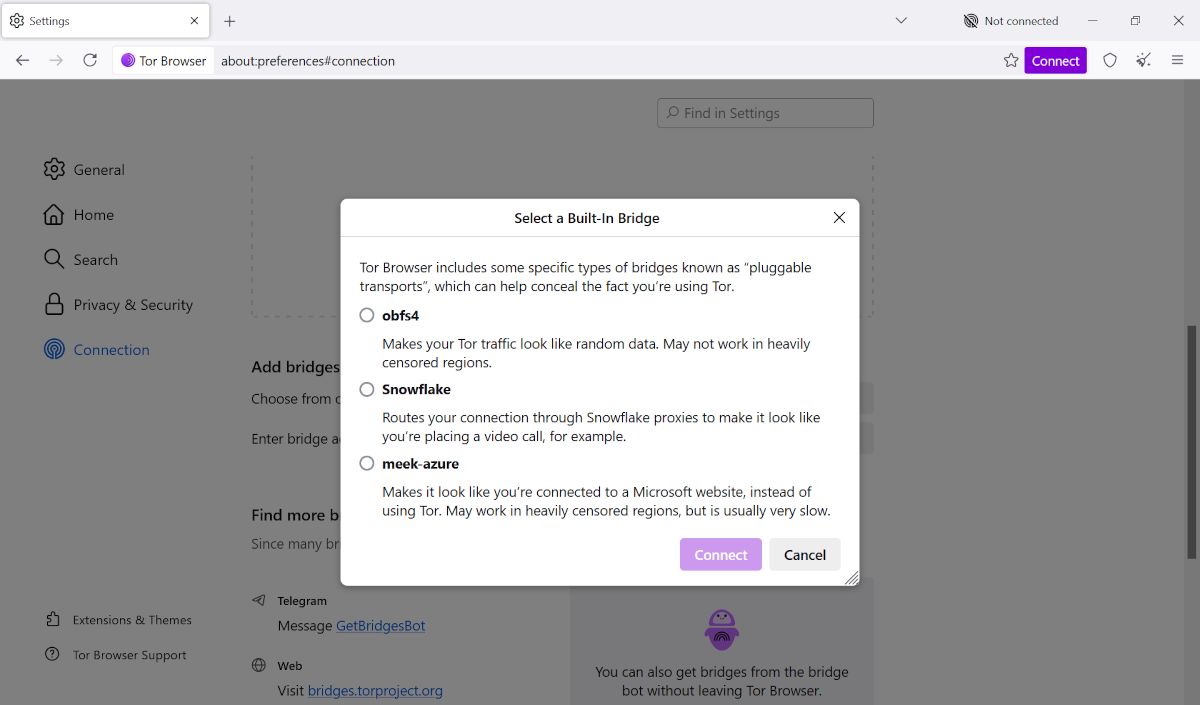
- On first launch, choose Configure Connection. Under Bridges, "Choose from one of Tor Browser's built-in bridges", then "Select a Built-In Bridge", then the transport, then Connect.
- If the browser is already open: ≡, Settings, Connection. Same Bridges section, select the transport, OK. Closing the settings tab saves it.
- On Android, the Belarus section's Snowflake path is the one Tor writes out: Configure connection, Connection, Config Bridge, Use a Bridge, Snowflake, then back to Connect. The same screens are where the other built-in transports sit.
A line you were sent
- Desktop, as the WebTunnel post still describes it: Connection settings, or Configure Connection, then "Add a Bridge Manually", paste the lines, close the dialog, Connect.
- Android: configure a bridge, "Provide a Bridge I know", paste, OK. Those labels are from March 2024. If the button now says "Request bridges" or "Enter a bridge", you are in the same place. The failure is pasting a Snowflake instruction into a box that wanted an obfs4 line, or the reverse.
Connection Assist will try a bridge or Snowflake for you when the first connection fails. Let it try once. If it picks a transport the table above says is a poor fit, China and WebTunnel being the example, override it. Assist is a guess from your region. The country page is the newer instruction when the two disagree, and in Belarus they already disagree: Assist stopped offering WebTunnel, and the written page still allows it.
Does a bridge hide the fact that you are using Tor?
From a censor who only has a blocklist, a private bridge is hard to name, and a transport makes the packets look like random data, a video call, or HTTPS. That is what Tor claims, and it is a claim about recognition, not about invisibility. The site at the far end still sees a Tor exit. Your provider, if they care enough to classify traffic rather than block a list, may still decide the flow is Tor. Whonix's tunnel page records the warning it attributes to Tor developers: bridges are less reliable and slower than normal entry guards, and if you do not live under censorship they are not necessarily safer than a guard.
So use a bridge for a block, or because being categorised as a Tor user on the local network is itself the threat. Don't turn one on in a country where Tor is legal and unblocked because a forum said bridges are "more anonymous." The exit behaviour does not change. You have only moved the first hop onto a relay fewer people share, which is a smaller crowd, not a better one.
Tor does say bridges "may slow down the connection compared to using ordinary Tor relays." meek adds its own cap. A bridge only changes your first hop, so it does not make you easier to identify at the exit. When people ask whether bridges are safe, the question that matters is the local network, and for that a bridge helps. The cost is speed.
Why the bridge you added is not connecting
Work from the failure you can see, not from a fresh download.
- You tried one built-in transport. Tor's general page tells you to try the others before you decide bridges are impossible. In Russia that means don't stop at Snowflake. In China it means don't stop at obfs4.
- The line is dead or already blocked. The daemon troubleshooting list, which applies to the addresses even if you paste them in the browser, says that after the configuration is sane the bridges you received may be offline or blocked, and you should request a new set.
- A proxy is set. Tor cannot use a bridge while a proxy is configured. A VPN client left running is the cousin of that problem. Turn it off and try the bridge again.
- The clock is wrong, or another Tor is already running. Those are ordinary connection failures, and the browser guide's "won't connect" list is the right order for them. A bridge does not repair a clock.
- You are in a shutdown, not a block. Iran from late February 2026 is the recent case. Snowflake, obfs4 and WebTunnel fail together because there is no route out, not because you picked the wrong disguise.
China has an extra miss: WebTunnel lines from the built-in menu are not what the country section tells you to use. Request /webtunnel from the bot, or pick WebTunnel on the bridges website, and paste what comes back. Built-in Snowflake is the fallback they name, then meek.
How to check whether Tor is blocked on your network
OONI Probe has a Tor test that tries to do the things a client has to do: fetch a consensus document from a directory authority, complete a TLS handshake to an OR port, and complete an obfs4 handshake. If every step works, Tor may work on that network, unless the block is a kind the test does not measure. If any step fails, Tor does not work there and may be blocked. That second sentence is OONI's, and it is stronger than the project's other page. The circumvention explorer says an anomalous measurement is not always a block, false positives happen, and tools often have their own ways around a block, so you should read Tor Metrics next to the probe result.
Run it on the network you actually use, not on a friend's phone and not through a tunnel. A test from a VPN tells you whether the VPN's network can reach Tor. The built-in obfs4 addresses in the test are the public ones. OONI's Russia report made the point that still holds: when those default bridges are blocked, a private line is the thing left, and a failed test of the defaults does not prove a private WebTunnel bridge will fail. There is a separate Snowflake test. A green obfs4 result and a red Snowflake result is a coherent outcome in Russia after the DTLS blocking, not a broken probe.
What you are reaching, once any of this connects, is still Tor: three relays, an exit the site can see, and a local observer who may only see the bridge. The bridge was the door. It is not a second network.
Running a bridge, or a Snowflake proxy, if you are not the one being blocked
The people who can connect without help are the supply. Two different jobs get mixed up on the Snowflake site, and the site is clear about the split.
If you are blocked, Snowflake inside Tor Browser, Orbot or Ricochet-Refresh is the client. The browser add-on does not unblock you. It is how an uncensored browser becomes a proxy for someone else. Install it, enable it, and the icon turns green when a blocked user connects. Leaving the tab open on an embedded badge does the same job for visitors to a site that hosts one. A standalone proxy on a computer or a server is the option Snowflake points "technically versed" people to, via its command-line guide. Don't follow that guide in order to get yourself online. You will have built a proxy and still have no client.
An obfs4 bridge is a machine you leave up, not a browser tab. Tor's bridge guide asks for a connection that stays up, and for TCP ports that are reachable from the internet, with NAT not hiding them. If you convert a relay you already run into a bridge, change the IP address, the name and the fingerprint, or the old identity is easy to blocklist. The guide is obfs4. WebTunnel has its own operator instructions, which the 2024 announcement pointed at without putting the steps on the blog. anoni.net's operator notes, which are not Tor's manual, describe a small VPS, a domain and a free TLS certificate, and say a bridge never makes the connection to the user's destination, so the legal exposure is not an exit relay's. Read Tor's current operator guide before you rent the VPS. An exit and a bridge are not neighbours. An exit is how strangers reach the open internet from your address. A bridge is how a censored user reaches Tor.
The Tor Project's own ask, next to the WebTunnel release, was for more bridges, more Snowflake proxies and more relays. If you are in a place where running one is safe, the add-on is the piece that does not need a server. If you are in a place where Tor use is punished, do not volunteer your home connection as the proxy. The green icon means someone else's traffic is coming through you.