
Tails vs Whonix: which one matches the computer you can lose
Tails vs Whonix is a choice about the computer, not a contest over which one is "more anonymous." Both send your traffic through Tor. Tails is a system you boot from a USB stick. It is built to start empty and to leave the machine's hard disk alone. Whonix is two virtual machines, a gateway and a workstation, and it keeps your files. Qubes-Whonix is those two machines inside Qubes OS, which is the one to look at when you also distrust the other software on the box. If you only needed a private browser on a computer you keep, you do not need either of them. Tor Browser on the system you already have is the smaller tool, and it is the right one until a seized disk or a borrowed PC is actually the threat.
Tails's own warning page opens with "safe but not magic." That is the honest answer to whether Tails is safe: it is safer than Windows or macOS for the session it was built for, and it does not stop a keylogger, a hostile firmware, a mistake in what you type, or an adversary who can watch both ends of a Tor circuit. Whonix does not stop those last two either. The difference is what a compromise of the desktop can learn about your address, and what a person holding the hardware can still see.
Which to use
| Your situation | Use | The reason it isn't the other one |
|---|---|---|
| A borrowed or shared computer, one job, nothing should remain on its disk | Tails | Tails runs from memory and says it never writes the hard disk. Whonix stores virtual-machine files on the host unless you have arranged for it not to. |
| The same pseudonym, documents and settings, week after week | Whonix | Whonix boots persistent by default, which is how it keeps Tor entry guards and ordinary upgrades. Tails can store a selection of files, and forgetting is still what it is for. |
| You do not trust the other programs on the machine, or you want one task thrown away | Qubes-Whonix | Qubes is the operating system. Whonix's gateway and workstation are qubes inside it, not an app on Windows. Whonix's comparison marks disposable qubes as not amnesic. They isolate a task. They are not a Tails wipe. |
| An Apple silicon Mac | Neither, as a current download | Tails does not work on M1, M2 and the rest of Apple's chips. Whonix says its VirtualBox image is not available for Apple silicon, and that running it there is still for developers. |
| Reading, research, an ordinary laptop you control | Tor Browser | A second operating system does not fix a login, a document that phones home, or a habit. Those are how people using Tor were identified. Move up this table when the disk or the hardware is the thing you are worried about. |
Tails OS review
Use Tails when the machine is not yours, or when a shutdown has to mean the session is gone. It is the Tor Project's system as of the 2024 merger, the install page was offering 7.15 in October 2026, and the warnings page is the honest part of any Tails OS review. The stick gives you away if someone takes the stick. Persistent storage gives you away if you keep two lives on it. Firmware, a keylogger and a both-ends observer are outside what it claims. For a borrowed PC and a single job, it is the one we would boot. For a pseudonym you return to every day, it is the wrong shape, and fighting it with a huge persistent volume just builds a worse Whonix.
Whonix review
Use Whonix when the work has to still be there tomorrow and you want a broken desktop not to know your real address. The gateway and workstation split is the reason to accept the RAM and the virtual machines. The practical costs are the host disk, which holds the virtual machines unless you encrypt it, and the habit of thinking the split protects you from Tor itself. It doesn't. Qubes-Whonix is the stronger host if the hardware will run Qubes. Plain Whonix on VirtualBox is the one a person can actually finish installing this week.
What is Tails OS? In the project's words, something you carry and boot instead of Windows, macOS or Linux. The FAQ calls it a live system. The about page calls it amnesic. Whonix is Debian plus Tor, split into Whonix-Gateway (`sys-whonix`), which is the only machine that talks to Tor, and Whonix-Workstation (`anon-whonix`), which is where you work and which is not supposed to know your real address. Qubes-Whonix is that split with Qubes as the hypervisor underneath, so the host is not Windows with VirtualBox on it. Qubes's own short page says the same shape, gateway as a ProxyVM and workstation as the place you make AppVMs, and says this replaced the old TorVM. That Qubes page was last committed on 8 December 2020 and it talks about Qubes 4.0. The template names in current use are on Whonix's side: `whonix-gateway-18` and `whonix-workstation-18`.
What a seized computer still shows
Does Tails leave no trace? Ask it twice. Once about the computer you borrowed, once about the stick in your pocket. Tails answers the first. Whonix's forensic page is the one that answers the second.
Tails says it never writes the hard disk, only uses memory, and deletes that memory on shutdown. A normal system, it reminds you, keeps sites you visited even in private mode, files you deleted, passwords, and the Wi-Fi networks you joined. Installing Tails onto the internal disk is not possible with the methods they recommend, on purpose, because amnesia depends on running from a USB stick or a DVD. Shut the machine down, pull the stick, and the computer's disk should look like you were never there. That is the claim. It is about that disk.
Whonix's persistence page says a Tails USB or DVD, examined by someone who has it, "can always trivially determine that Tails is on" it. The boot and system partition is unencrypted. User data in the optional persistent storage is encrypted. The unencrypted part does not leak your files. It leaks that this stick is Tails, and which version. Tails's own FAQ says the stick is not recognised in Windows, and that you should not use it to move files to another system, because a virus there could corrupt Tails. Windows not mounting the stick does not make the stick anonymous. Someone who knows Tails can see what it is without Windows mounting it. The stick is the evidence that you use Tails. The computer you booted it on is what Tails is trying not to mark.
Whonix leaves the opposite pair. By default the session persists: bookmarks, documents, the Tor entry guards. The virtual machines are files on the host. Someone with the disk can read them unless the host uses full-disk encryption. Someone who has already compromised the host, or the VM, can read them remotely. Whonix's way of leaving nothing is host live mode: boot the host as a live system, then run Whonix, and the files are gone after reboot. Its way of hiding the fact that you use Whonix, from a person holding the hardware, is full-disk encryption on the host. A powered-off encrypted laptop is a different object from a Tails stick. The laptop does not announce the operating system on an unencrypted boot partition. The stick does. The laptop, unencrypted, has the virtual machines sitting in a folder with Whonix in the name. The stick, if you remembered to pull it, is not in the laptop at all.
On the network, Whonix's comparison says an ISP cannot trivially guess that the traffic is Whonix, and also cannot trivially guess that it is Tails. The next row, "reasonable certainty" against advanced traffic fingerprinting, is "no" for both. Tails is plainer about the ordinary case: your ISP sees that you connect to Tor, and can probably tell it is Tails, because everything from the system goes through Tor and Tails users are meant to look like each other rather than like a random internet user. A bridge is how Tails tells you to hide that connection. Whonix adds that an ISP can guess a Tor live system is in use unless other people on the same link are not using Tails. The Tails half is Tails describing itself. The "cannot trivially guess" half is Whonix scoring both projects on its own wiki, and that table's Tails column is marked as not yet filled in.
IP leaks and malware: what the two-machine split is for
This is the part Whonix's comparison table looks like it settled, and it has not. The page says its contributors are most likely Whonix users, marks the Tails column as not yet filled in, and lists a "latest" Tails of 5.16.1. Tails's install page, on 21 October 2026, listed Tails 7.15, released 13 October 2026. A Safe/Fail grid scored against Tails 5.16.1, many releases behind 7.15, is Whonix's argument. It is not a test of the system you would download this week. Use the grid for the architecture it is pointing at. Do not use the word "fail" as if we watched an exploit land.
Whonix's claim is that the workstation can only connect through the gateway, so malware with root on the workstation still cannot learn your address. It also says the workstation is unaware of its external address, which is why it marks IP and DNS leaks "impossible" there. The same page says a root exploit on Tails can bypass Tails's firewall and discover the real address, because the firewall and the applications are on one system. That is a coherent description of two designs. It is Whonix describing Tails. What Tails says about its own network is that applications which try to connect without Tor are blocked, and that everything you do from Tails goes through Tor. Both sentences can be true of an intact system. Whonix is talking about a system that has already been exploited.
Where Whonix marks its own default setup as a failure is the virtual-machine escape: an exploit in the workstation plus an exploit of the virtualiser. Physical isolation, gateway on one machine and workstation on another, is the row they mark as surviving a workstation compromise, until the attacker also compromises that second machine. They call physical isolation an optional feature for advanced users. Qubes-Whonix is marked harder to break out of than VirtualBox, on Joanna Rutkowska's word as Whonix cites it, and a VM escape is still a failure on their grid. If the threat you are picturing is "malware that leaves the browser," Whonix's split is the design aimed at it, and a VM escape is the hole that design names. If the threat is "I used a computer that isn't mine," Tails never puts the session on that computer's disk, and a VM image would.
Tails's install page offers "running Tails in a virtual machine" as a side option. Whonix's table says Tails can run in VirtualBox and that this is not recommended. A Tails VM is a disk file on the host. You have given up the property that made Tails the right row in the table above, and you have not gained Whonix's gateway. Boot the USB, or run Whonix. The hybrid is how you get the inconveniences of both.
Hardware serial numbers and the LAN are a smaller version of the same split. Whonix says default settings hide hardware serials from software inside the workstation, and that Tails does not. Tails spoofs the MAC address on the local network, and Whonix says it does not, unless you are on Qubes, where the spoof exists and is off by default. A café that logs MAC addresses is a Tails problem, and Tails has a switch for it. A program inside the system asking the hardware for a serial is the thing the virtual machine is there to refuse. Which threat you have is the whole of the choice.
What you can keep between sessions
Tails can store documents, browser bookmarks, email and some extra software in an encrypted Persistent Storage on the stick. It is optional. The design document says you choose features from a list, the volume is LUKS, and by default the setup turns on a Persistent Folder and Additional Software. You unlock it at boot. If you skip that, you cannot unlock it later without rebooting. Everything you did not put on that list is still gone at shutdown. Tails also tells you not to use one session for two purposes, because a site can tie two logins to the same Tor circuit, and to use a second stick if the files in persistent storage would tie two lives together. Persistence is how Tails stops being amnesic for the files you chose. It is also how two jobs become one person.
Whonix keeps the session unless you go looking for host live mode. That is a better fit for a pseudonym you return to, and it is a worse fit for a computer someone else will sit down at tomorrow. Stream isolation, separate Tor circuits for different applications, is something both projects do. Whonix says its own is more extensive, and that a compromised workstation behind a shared gateway does not force stream isolation on non-Qubes Whonix unless you set that up. Qubes-Whonix, on that same row, enforces it. If you are running several workstations and you need a compromise of one not to stain the others, that is a Qubes property, not a reason to prefer plain Whonix over Tails.
Tails is part of the Tor Project
Yes, as an organisation, since 2024. On 26 September 2024 the Tor Project said the two had merged operations. Tails had asked in late 2023. The reason in the announcement is not a new threat model. It is fundraising, finances and HR, which intrigeri, Tails's team lead, called the hard part of staying independent for 15 years. Tails's FAQ now answers "what is the relationship between Tor and Tails?" with "Tails is part of the Tor Project. Tails was founded in 2009 and joined forces with Tor in 2024." The about page says Tails is made by the Tor Project.
While Tor Browser anonymizes online activity, Tails secures the entire operating system, from files to browsing sessions.
Qubes, the third name people add to this comparison, is a host, not a third live system. The merger does not make Tails a mode of Tor Browser, and it does not make Whonix a rival product Tor rejected. Whonix is a separate project. Its Qubes templates are still Whonix's to install on top of Qubes, which you install first. Pitting Tails or Whonix against Qubes is a slightly wrong framing: Qubes is the host. Qubes-Whonix is Whonix on that host. Tails is a third thing, a live system, and Whonix's table says Tails can run inside Qubes too. Running Tails inside Qubes is a specialist setup. It is not the choice in the table at the top.
What getting there actually takes
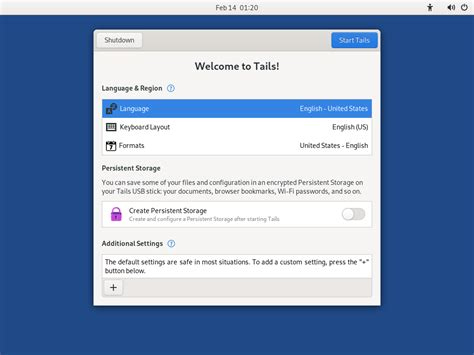
Tails wants a PC less than about 10 years old, 3 GB of RAM to run smoothly, a 64-bit x86 processor, and a USB stick of 8 GB or more that you dedicate to it. No phones, no Raspberry Pi, no Apple silicon. Nvidia and AMD Radeon cards often fail. Buy the stick yourself, from a known brand, in a shop. Tails cites the FBI's 2020 warning to US companies about sticks that arrived by mail carrying malicious software such as BadUSB, and tells you not to trust a stick someone handed you. Install from Windows, macOS or Linux, or clone from a person you already trust who runs Tails. The page's current version on 21 October 2026 was 7.15, from 13 October 2026. After you boot the stick you should be looking at Tails's own greeter, not your usual login screen. If the usual login screen is what came up, the computer never started from the USB. Tails describes the download as 1.8 GB and the install as half an hour. That size is the about page's figure, not a measurement of the current file. If you turn persistence on, buy a second stick of the same size and clone the first, persistence included. A third, cheaper stick is for the rare manual upgrade.
Whonix's non-Qubes requirements are 10 GB of free disk, a CPU with Intel VT-x or AMD-V, and 1 GB of free RAM if you cut the gateway to 256 MB. The layout it calls best performance is 8 GB: 2 GB for the host, 2 GB for the gateway, 4 GB for the workstation. The documented path is VirtualBox. Download the LXQt image, check the signature, install VirtualBox, then File, Import Appliance, leave the settings alone, and start Whonix-Gateway and Whonix-Workstation. KVM is listed as a supported platform beside VirtualBox. On Linux, Whonix warns that a new host kernel can break VirtualBox, and recommends Debian Trixie or Kicksecure 18 as the host. Changing the imported appliance "just a bit" is the step their import list tells you not to take.
Qubes-Whonix starts with Qubes installed on the bare machine, then the two templates, `whonix-gateway-18` and `whonix-workstation-18`. Whonix says this adds no requirements beyond Qubes's own. Its difficulty labels, on the same stale comparison page, call the Qubes-Whonix install easy and the non-Qubes install moderate, and call the knowledge you need in order to avoid a serious mistake "difficult" for Tails, Whonix and Qubes alike. The hardware bar is what stops people: Qubes wants a machine Qubes supports, with virtualisation extensions, and Tails wants a boring laptop with Intel graphics and a USB port that boots. Tails names ThinkPad lines, the X250, X1 Carbon, T440, T480 and T490, as machines that work, and says it knows of no Mac that runs Tails well and still runs the latest macOS.
Whonix's comparison also says Tails has no VPN support in any of the orders, user to VPN to Tor, user to Tor to VPN, or both. Tails's FAQ agrees: Tails does not work with VPNs, because the provider would see where you are and where you are going. A guide that installs Tails and then a VPN client has not read either project. When a VPN belongs in the picture at all is the other decision, and it is rarely "inside Tails."
What neither of them will do
Tails lists the limits in its own voice. An adversary who can see the traffic entering Tor and the traffic leaving it can try to match the timing. Tails says no anonymity network used for browsing or chat protects you completely from that, and that it does not know of this attack being used to deanonymise Tor users. An adversary who controlled all three relays in your circuit could. Tor picks relays from three operators. That is a defence against one malicious relay, not against a watcher on both ends. What that watcher has and has not done in public cases is the page for the fear. Choosing Tails does not retire it.
The exit can read traffic that is still plain HTTP, and can try to impersonate the site. HTTPS, and the browser's warning, are the mitigation Tails names. Files carry metadata, and Tails includes Metadata Cleaner because photos have identified people. A keylogger screwed into the keyboard works while Tails is running. Firmware and BIOS attacks are outside every operating system, Tails included, and Tails says it does not know of one used against its users. JavaScript is on by default in Tails's Tor Browser, because turning it off makes you look unlike other users. The security level and NoScript are there if you accept that trade.
Whonix marks three attacks as a failure for Whonix, for Tails and for Qubes-Whonix together: an attack on the Tor network, an exploit of the Tor process, and a backdoor in Tor. Its example of the first is the same end-to-end correlation Tails describes. The gateway cannot help you with a bug in Tor. Both systems are Tor. A different operating system from the privacy-tools list does not change that, and neither does a VPN wrapped around either of them.
Tails users are visible as Tor users, and as people probably using Tails, unless a bridge is on. Whonix users are visible as the owner of a disk that contains Whonix, unless that disk is encrypted or the session was a live host. Pick the exposure you can live with. The one neither project removes is a patient observer on both ends of the circuit, and a document or a login that names you after the network did its job. When the job is a first visit to an onion site, the dark-web guide says which of these is worth the USB stick and which is theatre.